
About RemoteSensing.App
RemoteSensing.App shows what satellites see over your fields. It takes the free imagery of the European Sentinel-2 and the American Landsat satellites, turns each picture into maps of vegetation and moisture, and works out, for every field, how those maps changed from one pass to the next.
This guide is for the people who use a group’s maps, fields, catalog and alerts. The site’s administrators have a guide of their own, the Administrator Guide, and the people who run the site the Technical Reference.
The words this guide uses
Section titled “The words this guide uses”-
Group: Everything the site shows belongs to a group: an estate, a mine, a farm or a region. Each person sees only the groups they have been given. When you have more than one, the group picker at the top of every page switches between them.
-
Field: A named area inside a group, drawn as an outline on the map: a block, a paddock, a pit, a stretch of river. The site measures every field in every picture.
-
Boundary: An outline of a different kind: a property line, a concession, an area to keep out of. Boundaries are drawn on the map in their type’s colours, and a boundary can be watched along its edge (fenceline monitoring).
-
Scene: One picture taken by one satellite on one pass. The site keeps a catalog of every scene over each group, and processes the ones chosen for it.
-
Index: A map worked out from a scene’s colour bands, one number per pixel: NDVI for how green and dense the vegetation is, NDMI for how much water it holds, and many more. The site’s library has nearly 300.
-
Colour composite: A picture made from three of a scene’s bands, such as True Color, the picture as your eye would see it, or infrared views that make vegetation stand out.
-
Monthly composite: A picture built from every usable scene of one month: for each spot, its clearest pixel. A month’s composite is often clear where every single scene had cloud somewhere.
-
Quarterly composite: The same, built from the three months of a calendar quarter, for the groups an administrator has switched it on for. It is clearer still where clear days are few.
-
Statistics: For each field, scene and index: the mean, the median, the spread, the lowest and highest values, and how many of the field’s pixels were clear, cloudy or empty. The charts, the field values and the alerts all read these.
Where the pictures come from
Section titled “Where the pictures come from”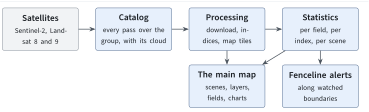
From a satellite’s pass to the map.
-
The catalog. Every day the site asks the satellite archive which scenes cover each group, and records them with their date, satellite and cloud cover. A small preview of each is kept, so you can look before anything is processed.
-
Choosing scenes. A scene is processed once someone marks it for download in the catalog (The satellite catalog), or once the site chooses it for a monthly composite.
-
Processing. The scene’s bands are downloaded for the group’s area, every index is worked out, and the results are cut into the map tiles the main map shows. Cloud and cloud-shadow masks are made at the same time.
-
Statistics. Each field’s numbers are worked out for every index, and the fenceline’s for every watched boundary.
Processing takes several minutes for each scene, and scenes wait their turn, so a scene marked in the catalog reaches the main map once its turn has come. The main map shows only scenes that have been processed.
The two satellites
Section titled “The two satellites”| Sentinel-2 | Landsat 8 and 9 | |
|---|---|---|
| Run by | the European Space Agency, for the EU’s Copernicus programme | NASA and the US Geological Survey |
| Pixel | 10 m (some bands 20 or 60 m) | 30 m |
| Revisit | about every 5 days | about every 8 days with both satellites |
| Strength | detail, red-edge bands for crop health | a long record, thermal bands |
Sentinel-2 is a family of satellites: Sentinel-2A, 2B and 2C today, and Sentinel-2D when it starts sending scenes. The site treats every one of them as Sentinel-2, with the same layers, cloud mask and shadow mask. The map, the reports, the downloads and the processing all read one shared list of the satellites, so they always agree on which satellite took a scene.
Some indices exist for one satellite only, because they need a band the other lacks. The main map’s layers name the satellite when that matters, and keep your chosen layer as you step from one satellite’s scene to the other’s (Choosing a layer).
A third kind of scene comes from Sentinel-1, a radar satellite. It sees through cloud, and shows clearing and fire scars rather than colours, in layers of its own. A group has it only when an administrator has switched it on; Reading radar (Sentinel-1) explains how to read it.